
This is an old revision of the document!
Table of Contents
Introduction
This document describes the use of the “looping” tool in Bizweaver.
Audience
This document is intended for developers of Bizweaver workflows.
Related Documents
The following documents contain additional information that may be helpful with the development of Bizweaver workflows.
- Bizweaver – Configuration Guide
General Workflow Rules
- Each workflow step must have a unique name.
- The application will assign a default name, but we recommend that you change the name to something that helps you understand the purpose of the step.
- The name cannot have spaces or special characters other than and underscore (_).
The Looping Tool
The Bizweaver “looping” tool is a mechanism used to process a series of objects in succession while, optionally, performing other actions on each object. Typical use cases include:
- Processing a set of records generated from an SQL Command: Reader
- Processing multiple input files in one workflow cycle
- Processing records from a File Reader step into an SQL table
- Processing records from an SQL Command: Reader step into a File Writer: Custom String step
The logic of the looping process is straightforward.
- A “virtual” list is created. The list is “virtual” because it only exists within the workflow during execution. The list can be a list of records or a list of files.
- The Loop processing step uses the list as its input.
- When the loop processing starts, the first record in the list is processed. The processing can be a single action or (more commonly) a series of actions.
- When the processing steps are done, the loop checks to see if there is another unprocessed record in the list.
- If another unprocessed record is found, the steps between the Loop and LoopEnd steps are executed for the next record.
- If no unprocessed records are found, the loop ends, and the processing continues to the next step in the workflow.
In the following examples, the name of the Loop and LoopEnd are similar. However, the names of the looping steps are used only to assist the developer. The only requirements are that for each “Loop” step there must be a corresponding “LoopEnd” step, and that the step name is unique.
Simple Example
This example illustrates the use of looping to process a set of records from an SQL Command: Reader step. In this case, we are using Customer Contact Persons in SAP Business One. We will send an email to each contact.

- The first step is to create a list of contacts. In this example, we use the internal code assigned to each contact by SAP Business One. From this we get a list of code values.

- A loop is started using the list from step 1 as input. (Linked Object).

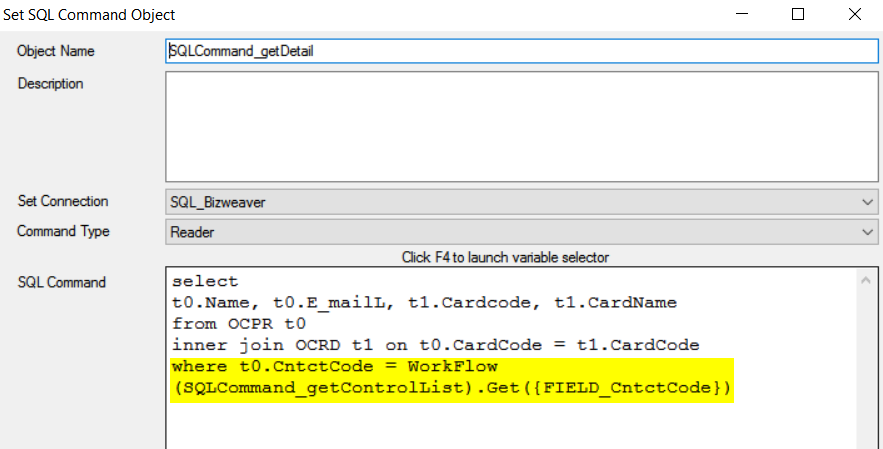
- A second SQL Command: Reader step is used to get the details for the first contact record.
- The code from the list is used to get the specific information for the contact.
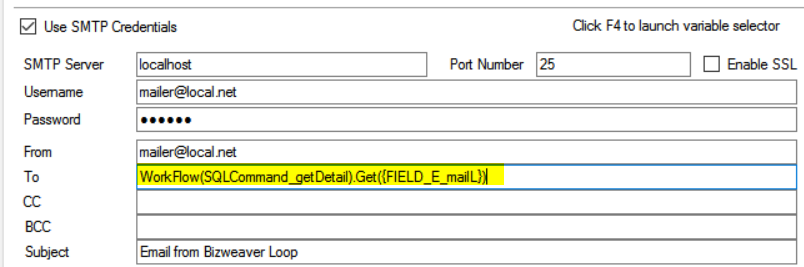
- The e-mail is created.
- The recipient’s e-mail address is taken from the details in step 3.
- The application now checks to see if there are any additional records in the list passed into the loop that have not been processed.
- If an unprocessed record is found, steps 3 and 4 are executed for the next record.
- If no records remain to be processed, the loop ends, and the process continues to the next workflow step.


In this example, the list is created for a single value. The details needed for processing are then retrieved for each record inside the loop. Another approach is to get all the information needed in the first SQL step. The second SQL step inside the loop is then not required since all the information is available. There are no specific rules about which approach to use. However, attempting to feeding very large blocks of data into the loop can potentially cause failure of the workflow.
Loop-Within-Loop Example
This example illustrates a more complicated set of looping cycles; a loop within a loop. The first loop processes a list of files from a File Operations: Get step. The second loop, which is inside the first loop, processes the records in each file and posts them into an SQL table. This type of loop processing is very common.

- The first step is to create a “virtual” list of files to be processed. This is done using File Operations: Get. In this sample, we are processing any .csv file starting with “test.”

<ol start="2" style="list-style-type: decimal;"><li><p>
The initial loop processes the list of files created in step 1.
</p><ol style="list-style-type: decimal;"><li><p>
The input is selected from the “Linked Object” drop-down list.
</p></li><li><p>
If a file is found, the workflow proceeds to the next step (3).
</p></li><li><p>
If no files are found to process, the workflow proceeds to the end of the loop (step 7) and, in this case, ends.
</p></li></ol></li></ol>

<ol start="3" style="list-style-type: decimal;"><li><p>
A File Reader step processes the file presented from step 2.
</p><ol start="4" style="list-style-type: decimal;"><li><p>
The file is referenced using a variable as shown.
</p></li><li><p>
The output of the File Reader is a virtual list of the records in the file.
</p></li></ol></li></ol>

<ol start="4" style="list-style-type: decimal;"><li><p>
A second loop processes the list of records created in step 3.
</p><ol start="6" style="list-style-type: decimal;"><li><p>
The input is selected from the “Linked Object” drop-down list.
</p></li><li><p>
If a record is found, the workflow proceeds to the next step (5).
</p></li><li><p>
If no records are found, the workflow proceeds to the end of the loop (step 6).
</p></li></ol></li></ol>

<ol start="5" style="list-style-type: decimal;"><li><p>
The record from the previous step is inserted into an SQL table.
</p><ol start="9" style="list-style-type: decimal;"><li><p>
The input values are referenced by Bizweaver variables.
</p></li></ol></li></ol>

<ol start="6" style="list-style-type: decimal;"><li><p>
At this Loop End, the application tests to see if any records from the virtual list have not been processed.
</p><ol start="10" style="list-style-type: decimal;"><li><p>
If unprocessed records are found, the process returns to the starting point of the current loop (step 4)
</p></li><li><p>
If no unprocessed records are found, the process continues to the next step (7).
</p></li></ol></li><li><p>
At this Loop End, the application tests to see if any files from the virtual list have not been processed.
</p><ol start="12" style="list-style-type: decimal;"><li><p>
If unprocessed files are found, the process returns to the starting point of the current loop (step 4)
</p></li><li><p>
If no unprocessed files are found, the process continues to the next step, which is the end of the workflow.
</p></li></ol></li></ol>
Appendix A – Conditional Looping
A feature added in Bizweaver 2.1.0 is the ability to use conditions in loops. The functionality is used in place of the “Linked Object” as input. Its primary use is for web service calls that require paging to retrieve all records from the remote system. However, it may be used for other purposes as well.
A loop can use only a “Linked Object” or a “Conditional Expression.” Both options cannot be used simultaneously.
The following example workflow illustrates how conditional looping works. This example is for demonstration purposes but can serve as a foundation to understand the concept.
In this example, we want to drop out of the loop when records are no longer available for processing. The difference here is that we are checking for valid records in blocks of 50 records. Again, this for illustration only.

- Two variables are used: MaxDocEntry and RecsRemain. The variables are defined and initialized in the “Variables_Init” step.

MaxDocEntry starts at 0 so the following tests begin with the lowest record ID (DocEntry). RecsRemain starts at 1 to indicate that records to remain to process.
<ol start="2" style="list-style-type: decimal;"><li><p>
Loop_Counter begins the loop process. This is where the looping condition is established.
</p></li></ol>

The condition to continue processing (looping) is that the “RecsRemain” variable = 1.
<ol start="3" style="list-style-type: decimal;"><li><p>
The SQLCommand_checkMaxRec step determines the last DocEntry value in the current block of 50 records. This value will be used in the next step.
</p></li></ol>

<ol start="4" style="list-style-type: decimal;"><li><p>
The SQLCommand_checkRemainCount set determines whether records remain or not.
</p></li></ol>

Note that the value used for “RecsRemain” is either a 0 or a 1.
<ol start="5" style="list-style-type: decimal;"><li><p>
The two variables established at the beginning of the workflow are updated.
</p></li></ol>

<ol start="6" style="list-style-type: decimal;"><li><p>
At this point the difference between a “Linked Object” loop and a “Conditional Expression” loop comes into play. In a “Linked Object” loop the process would check to see if another single record exists for processing. In this “Conditional Expression” loop the process instead checks the value of the “RecsRemain” variable. The determination to continue looping is made based on this value. Once the “RecsRemain” variable value changes to 0, the loop ends.
</p></li></ol>


