
This is an old revision of the document!
Table of Contents
Container Management (Web Client) How To Examples
How to Populate the Container Management Carrier UDT
The SAP B1 Container Management Carrier UDT screen allows the user to create and maintain information for containers in the B1 Web Client.
- Click the CM Carrier Table menu option under the Tools
 User Defined Windows menu groups.

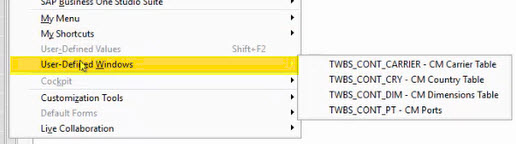
- Once the CM Carrier Table has loaded, you can edit existing entries or add new entries to the table.
If a value in the table has been previously used on a container record, you should not remove it from the table until the records utilizing that value have been updated to a new Carrier option.
- Click the Update button.

How to Populate the Container Management Country UDT
The SAP B1 Container Management Country UDT screen allows the user to create and maintain information for containers in the B1 Web Client.
- Click the CM Country Table menu option under the Tools User Defined Windows menu groups.
- Once the CM Country Table has loaded, you can edit existing entries or add new entries to the table.
If a value in the table has been previously used on a container record, you should not remove it from the table until the records utilizing that value have been updated to a new country option.
- Click the Update button.
How to Populate the Container Management Dimensions UDT
The SAP B1 Container Management Dimensions UDT screen allows the user to create and maintain information for containers in the B1 Web Client.
- Click the CM Dimensions Table menu option under the Tools User Defined Windows menu groups.
- Once the CM Dimensions Table has loaded, you can edit existing entries or add new entries to the table.
If a value in the table has been previously used on a container record, you should not remove it from the table until the records utilizing that value have been updated to a new dimensions option.
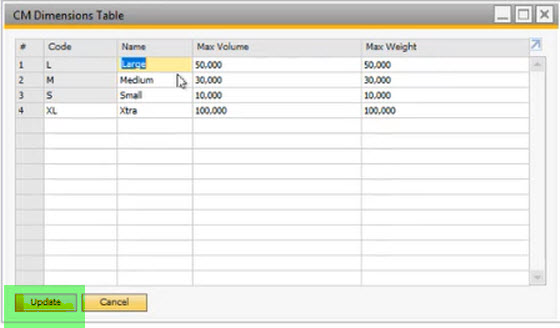
- Click the Update button.
How to Populate the Container Management Ports UDT
The SAP B1 Container Management Ports UDT screen allows the user to create and maintain information for containers in the B1 Web Client.
- Click the CM Ports menu option under the Tools User Defined Windows menu groups.
- Once the CM Ports Table has loaded, you can edit existing entries or add new entries to the table.
If a value in the table has been previously used on a container record, you should not remove it from the table until the records utilizing that value have been updated to a new Ports option.
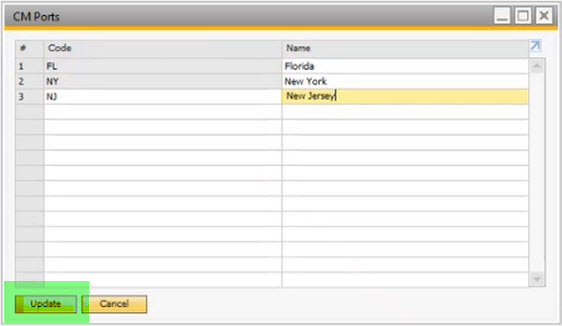
- Click the Update button.


