
This is an old revision of the document!
Table of Contents
Settings
Data View Record Threshold
The system will warn users when a Data View returns more records that the established threshold.

Bizweaver Token
The Bizweaver token is a key generated in the Bizweaver application. It is used in Versago for authentication of calls to the Bizweaver web service. Information on generating the token can be found in the Bizweaver wiki . Copy and paste the token generated from Bizweaver.

Session Inactive Period
Set the time a user’s session can be inactive before the session is automatically closed.

Email Server
The settings are used to configure a connection to an SMTP (email) server. This allows Versago to send password recovery email.
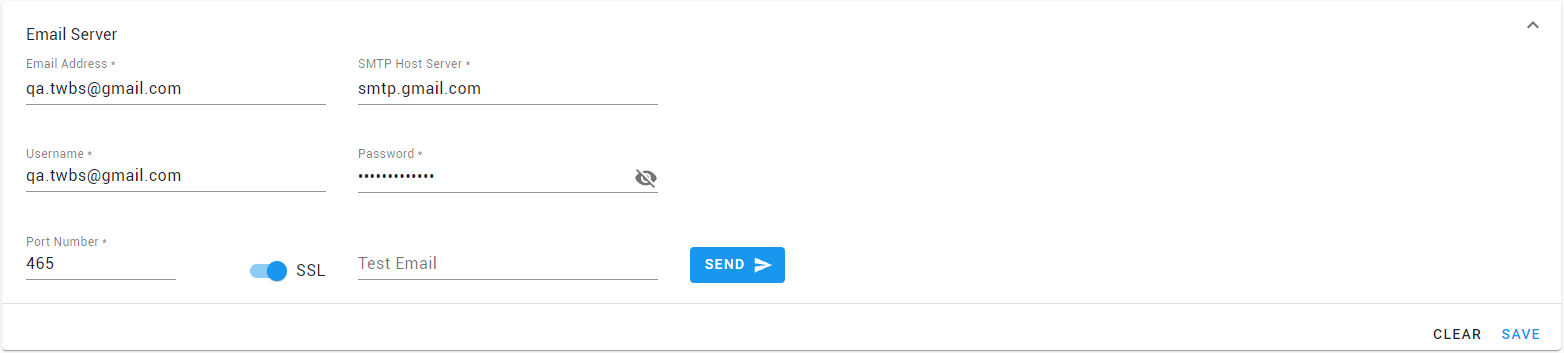
- Only one SMTP connection can be defined for a Versago installation.
- Enter a valid email address for your system. This will act as the “From” user name.
- Enter the name or IP address of your SMTP server.
- Enter the username and password to authenticate to the SMTP server.
- Enter the port used for SMTP traffic. This will typically be 25 unless SSL is in use. For SSL the port will typically be 465. Consult with your network administrator if you have any questions.
- Test Email is used to verify your settings.
- Enter a recipient email address and click [Send].
For security reasons, the password is not shown once the settings are saved. You will need to re-enter the password to send a test email.
Password Reset
This setting is used to configure the message that is sent when a user clicks the “Reset Password” link on the Versago home page.
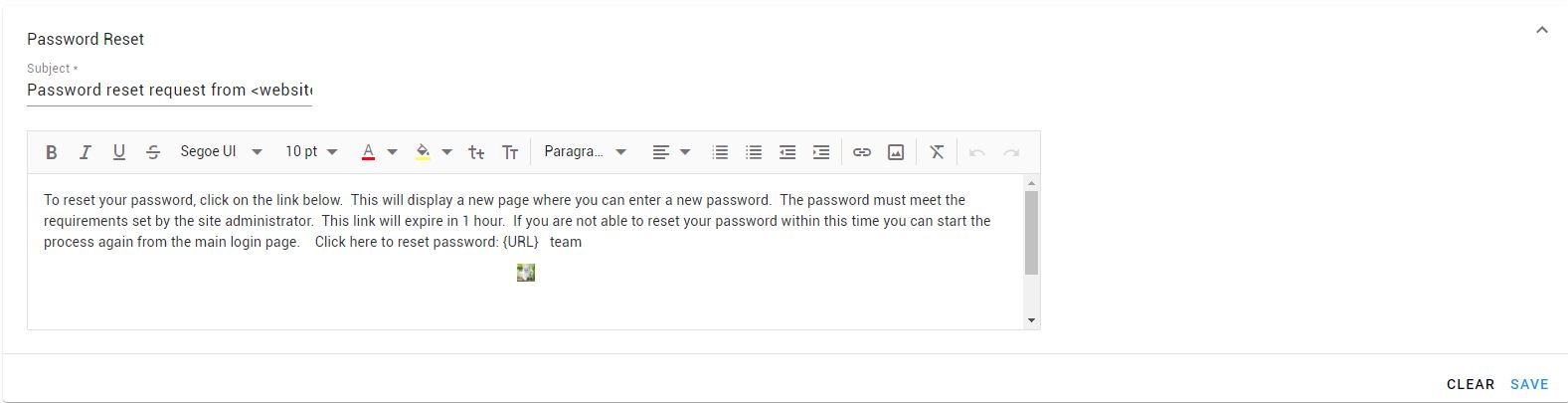
The Email Server configuration is required to send the password reset message.
Payment Gateway
The settings are used to configure the payment gateway credentials and valid payment methods to process payments through Versago.

- Currently only Authorize.Net is supported
- Select valid payment methods
- Select the Demo option during testing. This option must be cleared for production operations.
For security reasons, the password is not shown once the settings are saved.
Time Zone - Versago Server
Select the time zone where Versago is hosted. This is then used in conjunction with the user’s time zone in calendar data views

Form File Upload Setting
Enter the list of file type extensions allowed to be uploaded in Forms and the maximum file size

After changing the File Upload settings, go to IIS, Application Pools and restart the Versago pool.
Installation ID


