
versago3:dataview_filters
Table of Contents
Filters
Versago Data Views can filter data before it is displayed to the user. There are two types of filters:
- User-Applied
- User Account.
Filters associated with Crystal Reports or Stored Procedure parameters are automatically displayed in this step.
User-Applied Filters
User-Applied Filters allow the user to provide input about how they want to filter the information for selection.
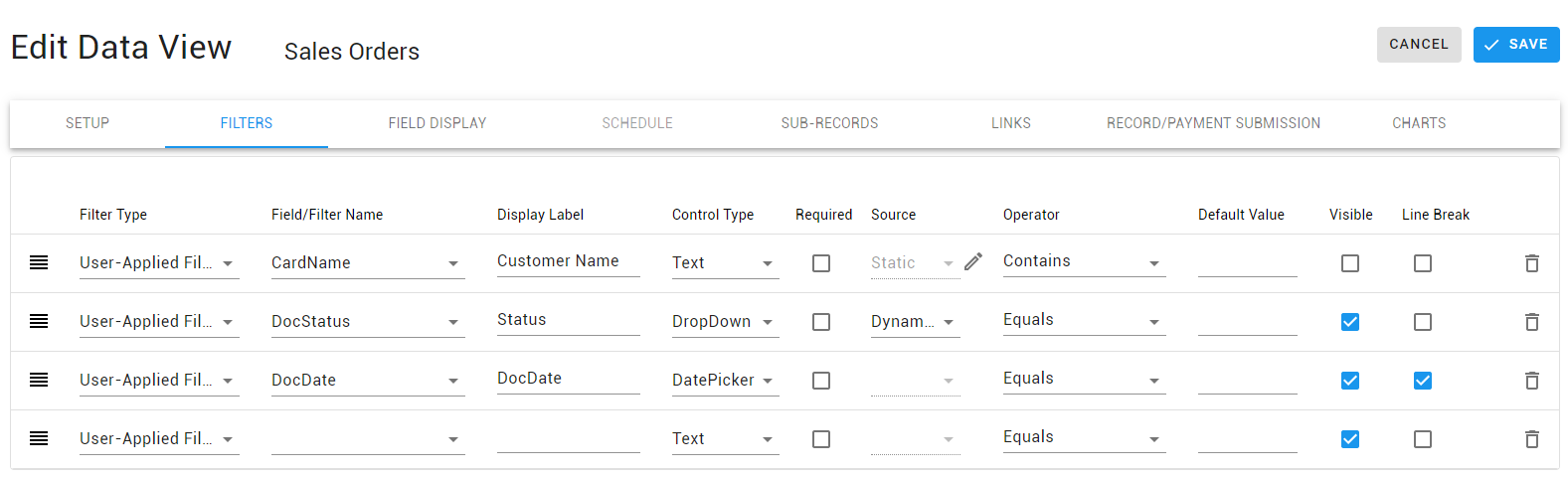
- Select User-Applied Filter as the Filter Type .
- Select the data view field to be filtered from the Field/Filter Name drop-down list.
- Type a Display Label for the user.
- Control Type defines the type of field used to enter the filter:
- Dropdown
- Text
- DatePicker
- Numeric
- Required makes a filter mandatory.
- Source is only available with the Drop-Down control type and defines how the values are generated.
- Dynamic creates a list of unique values from the data set.
- Static allows the developer to create their own list of selection values.
- Operator sets the default filtering option.
- Default Value sets a default filtering value. The value can be changed by the user at execution time.
- Visible indicates if the user sees the filter. A “Default Value” must be defined if this option is used.
- Line Break introduces a line break between filters when multiple filters are used. Otherwise, the system will auto-order the filters based on available space.
If default values are required for the between operator, separate the two values with a ; (semi-colon).
User Account Filters
User Account filters are predefined by the Versago administrator. They are applied automatically when the data view is executed. The filtering value(s) are associated with each user. The account filters must be defined before they can be associated with a report.

- Select User Account Filter as the Filter Type.
- Select the Account Filter from the “Field/Filter Name” drop-down list.
- No other information is required.
How to set up an Account Filter
Application of Filters
- A data view can have multiple filters.
- User-applied filtering is applied based on the display order of the filters. This means that the first value filters the initial data set, giving a data subset. The next value then filters the first data subset, and so on.
- User account filters are automatically applied. Filtering is done based on the data filters associated with the current user.
- When both user-applied and user account filters are defined, the user account filter is applied first
versago3/dataview_filters.txt · Last modified: 2023/10/30 09:17 by dlee
Except where otherwise noted, content on this wiki is licensed under the following license: CC Attribution-Noncommercial 4.0 International


