
versago3:oauthsetup
This is an old revision of the document!
Table of Contents
SMTP OAuth setup with Microsoft Exchange Online
Sign in to Azure Portal
- Go to https://portal.azure.com
- Sign in with your Microsoft 365 admin account
Register a New App
- Navigate to App registrations
- Select App registrations from the left menu
- Click '+New registration'.
- Fill out:
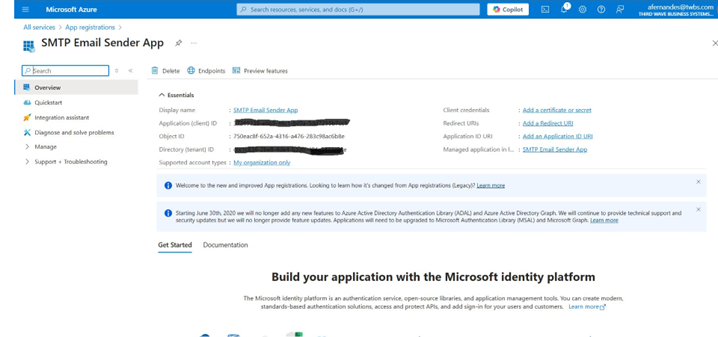
- Name: SMTP Email Sender App
- Supported account types: Accounts in this organizational directory only (Single tenant)
- Redirect URI: Leave blank
- Click 'Register'
After registration, note:
- Aplication (client) ID → Client ID
- Directory (tenant) ID → Tenant ID
versago3/oauthsetup.1747421193.txt.gz · Last modified: 2025/05/16 14:46 by afernandes
Except where otherwise noted, content on this wiki is licensed under the following license: CC Attribution-Noncommercial 4.0 International


